SHAPES
Page 6
This
tutorial was written by Jemima ~
September 2003..
Copyright © 2003 ~
Jemima ~ All rights reserved
********************************
Go to LAYERS >>> Duplicate
Go to IMAGE >>> Rezize = 85%
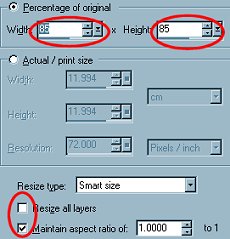
Click OK
Go to IMAGE >>> Rotate = 10
degrees Left
Go to EFFECTS >>> Sharpen
>>> Sharpen
Go to LAYERS >>> Duplicate
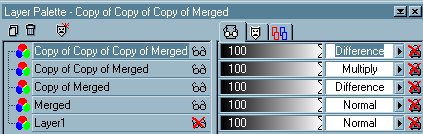
Go to your LAYER PALETTE
On the "Copy of
Merged" change the "Blend"
to "DIFFERENCE"
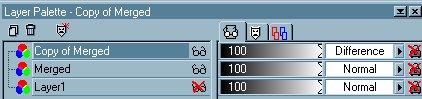
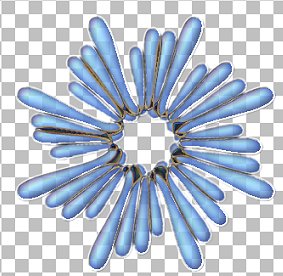
Go to your LAYER PALETTE
On the "Copy of Copy of Merged"
change the "Blend" to
"MULTIPLY"
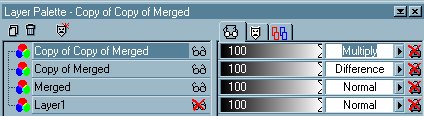
Go to IMAGE >>> Rotate = 10
degrees Right
Go to EFFECTS >>> Sharpen
>>> Sharpen
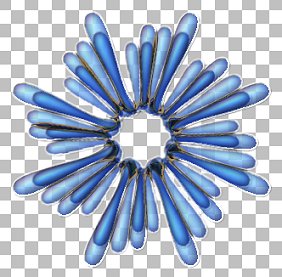
Go to LAYERS >>> Duplicate
Go to IMAGE >>> Rezize = 65%
Click OK
Go to IMAGE >>> Rotate = 10
degrees Right
Change the BLEND MODE on "Copy of
Copy of Copy of Merged" to
'Difference'
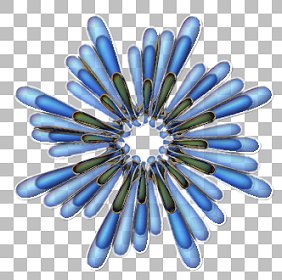
Go to LAYERS >>> Merge
>>> Merge Visible
NEXT
Page designed by

Copyright ©
2000-2003 Jemima
All rights reserved.
Unless specifically made available for
download,
no graphics or text may be removed from
this site for any reason
without written permission from Jemima

 NEW TUTORIAL INDEX NEW TUTORIAL INDEX
|