ANIMATED EASTER
BUNNY
Page 4
This
tutorial was written by Jemima ~ December
2003..
Copyright © 2003 ~
Jemima ~ All rights reserved
********************************
Your 2 frames will now appear in your
Animation Shop Window

Go to the TOP RIGHT Menu Bar
and click on the 'View Animation' icon
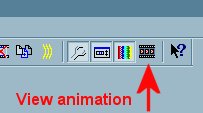
The finished animation will show in the
window.

If you are satisfied with the animation
Go to FILE >>> Save As
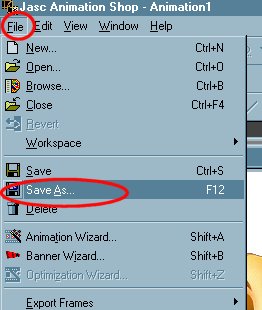
You should be taken to the same folder in
which
you saved the .psp image
Click on SAVE

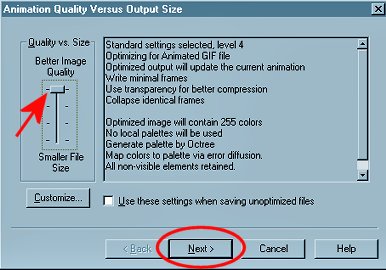
Since we only have 2 frames in this image
we will go for "Better Image
Quality"
Click on the NEXT button
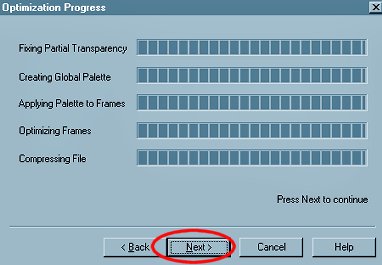
This is Animation Shop doing it's
processing
Click on the NEXT button
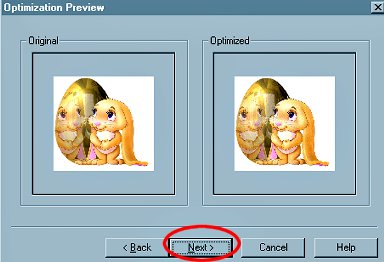
A preview of your animation
Click on the NEXT button
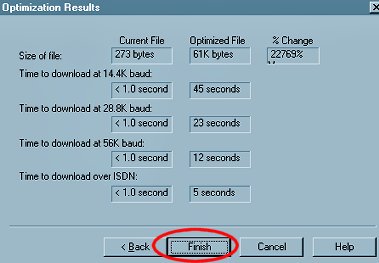
This shows how long it will take for you
image to download
for people viewing it depending on the
Modem they are using.
Since most people have 56k Modems...
our image will take 12 seconds to
download... which is pretty good *S*
Click the FINISH button
You will now be taken back to youe
Animation window.
CLOSE the animation (by clicking on the X
on the top right of the image)
Close the FRAMES (the same way)
Close Animation Shop.
That's it!!
To see what happens when you create the
animation with a transparent background,
go to the next page
NEXT
Page designed by

for

http://www.artistrypsp.com/
Copyright © 2000-2004 Artistry In PSP / PSP Artistry
All rights reserved.
Unless specifically made available for download,
no graphics or text may be removed from this site for any reason
without written permission from Artistry In PSP / PSP Artistry
|